Features
What Milra does
Only what ships today, described plainly.
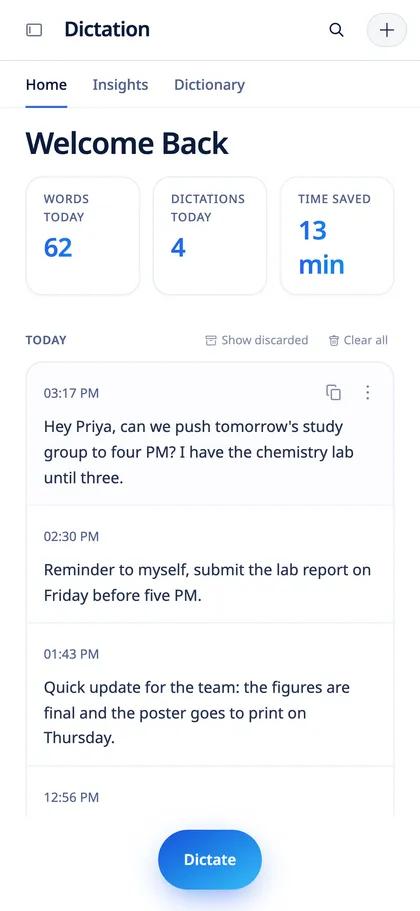
Insights
See how much you speak, not type
Words spoken, words per minute, dictations and a daily streak, calculated on your device.

Notetaker
Transcript, summary and questions in one place
Open a lecture to read the full transcript, switch to the AI summary, or ask anything about the note.

Settings
Tune it without a maze
Speaker labels, echo cancellation, unclear audio markers, templates and calendar connections sit in plain sections.

On your phone
The same notes on iPhone
Reminders and notes sync to the iPhone app, which also records lectures with the screen locked.

First run
Set up in a minute
A short welcome, then you pick your shortcut and microphone. Nothing is recorded until you press the key.


The pill in each state, captured from the app.
Dictation
- Hold-to-talk or toggle with a global shortcut, in any app.
- Local Whisper speech recognition, with a fast tier for short phrases.
- Cleanup that removes filler words and fixes punctuation.
- Personal dictionary for names and terms, synced across devices.
- Type for me: type the text into the app instead of pasting it, with a speed setting and undo.
Languages
- 21+ languages, including Hebrew.
- Right-to-left text is handled correctly.
Lecture and meeting notetaker
- Live transcript while recording.
- AI summaries saved with each note, organised in folders and classes.
- Unclear audio is marked in the transcript instead of being guessed.
- Echo cancellation option for meetings.
- iPhone records with the screen locked.
Auto reminders
- Spoken to-dos and deadlines are extracted into reminders.
- You review and keep what is useful.
Sync
- Notes, dictionary, reminders and history on Mac, Windows and iPhone.
- One sign-in, no manual export.
- Delete all synced data from your account at any time.
Claude and ChatGPT connector
- A private link you paste into Claude or ChatGPT as a custom connector.
- The assistant can search and read your notes and dictations, and add to a note.
- Revoke the link whenever you want.
Privacy
- Speech recognition runs on your device.
- Audio leaves the device only for low-confidence checks.
- Analytics and error reporting are opt-in.